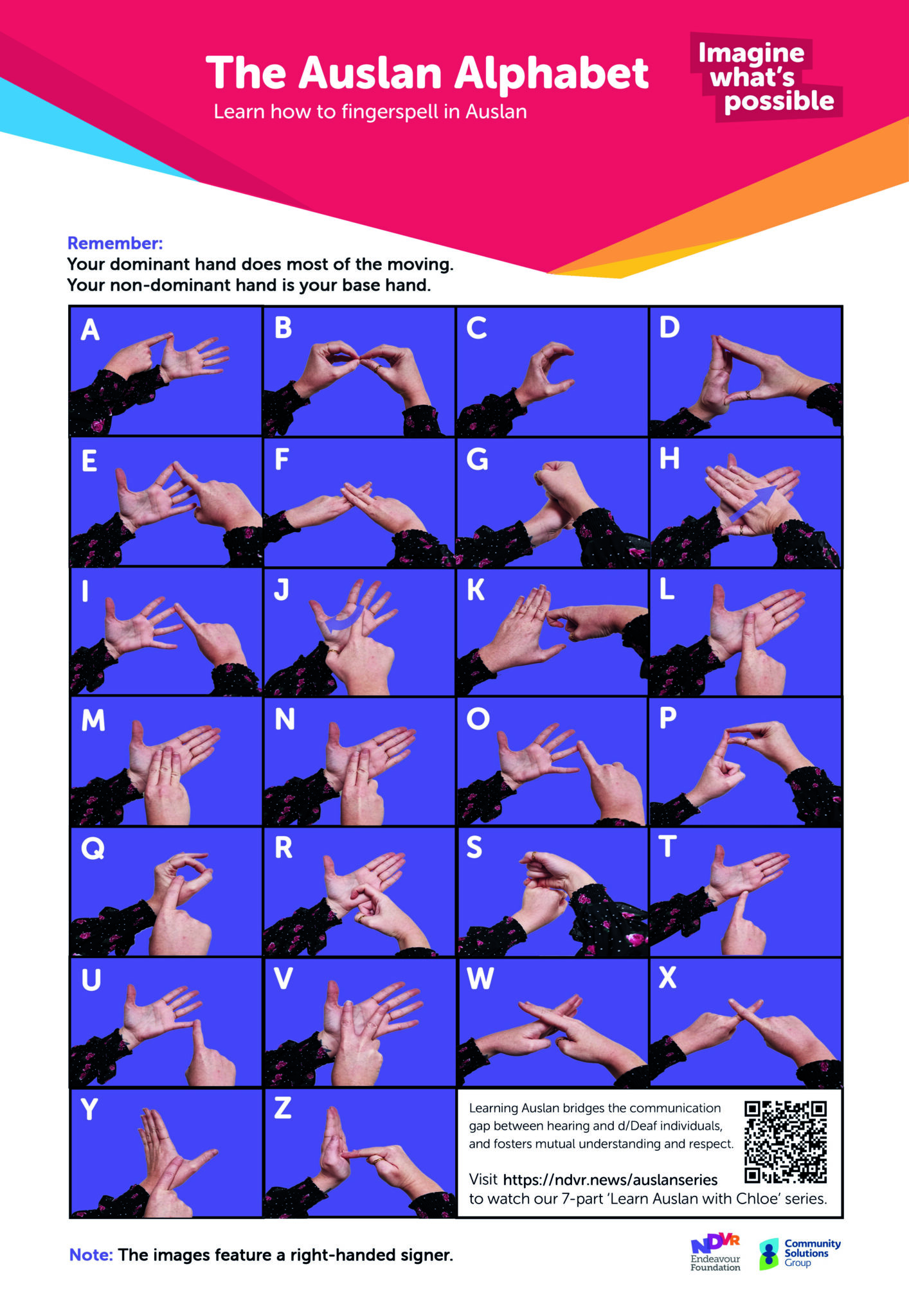
Auslan Alphabet Poster
Learn the Auslan alphabet.
The Document Management System (DMS) is where you will find all of our policies, procedures, forms and other controlled documents.


This guide aims to provide you with helpful tips to consider when preparing for a potential client visiting your service. It also assists you in answering some common questions they may have.
The information included in this guide covers the following topics:
| Suggestions for preparing the site. | Preparing clients for a new visitor. | Preparing your employees for a new visitor. |
Where do I find it? QD 3106 Community Site Tour Guide
If you have any feedback or queries, please contact Document Management team [email protected]
Regrettably, DMS doesn’t work in the Citrix environment which operates in Internet Explorer. It will only work in Google Chrome. To access in Google Chrome, you will need to click out of Citrix, open Google Chrome and add URL https://endeavourfoundationaust.sharepoint.com/sites/DMS
DMS is a SharePoint (Microsoft) program and all documents automatically open in the online applications i.e., Word Online, Excel Online. To ensure that your document opens in Word App so that you can type into it, please follow these steps:
You will find the search function in the purple ribbon across the top of the homepage.
No, once you complete a form it becomes a record and only controlled documents can be stored on DMS. A record is created when the form is completed (when something has happened, and the event is documented). Controlled documents can be revised and changed; records can never be changed.
Please contact the DMS team [email protected] with your specifications/requirements.
All document updates are reported via the DMS Bulletin which is included in the mid-week ‘Your Weekly Update’ sent to all Endeavour Foundation employees. Copies of the DMS Bulletin are also available via the link on the DMS homepage.
We are always seeking feedback from our readers to help us improve the system and more importantly, give you a better DMS experience. We encourage you to submit your suggestions via the Feedback section on DMS or via email to [email protected].
If you prefer to talk to one of our friendly team members directly, you will find our details on the DMS homepage. If your feedback is about a document (policy, procedure, form etc), we will contact the document owner and pass on the details. We will also stay in contact with you and let you know the outcome.
You will need to firstly download the PDF and then on the far right side of the PDF, midway down you will see an option ‘Fill & Sign’. If you click on this, you will have the ability to hover your mouse over the section you would like to complete and there will be a text icon. Click on the area and you will be able to start typing.
The purpose of this bulletin is to provide information and tips for Endeavour Foundation employees to review their current medication practices and implement process improvements to reduce medication mismanagement.
Please contact Client Safeguarding at [email protected] for any advice or further information regarding the content of this Practice Bulletin.
It is the responsibility of all of us to ensure the safety and wellbeing of people we support. This includes when transporting people we support in a fleet vehicle, a personal vehicle or as part of a group to and from programs and events.
Please contact Practice, Quality and Impact at [email protected] for any advice or further information regarding the content of this Safety Alert.